From decision to full support: AC3 Optimus™ startup and initiation
The order of work from the moment a physician decides on an intra-aortic balloon pump (IABP) to full support at 1:1, with what normal looks like at each stage and what to do when it doesn't. Every line is cited; each problem links to the full procedure.
Written for the clinician running the console. The decision to use an IABP, and the insertion itself, belong to the physician and the IAB catheter Instructions for Use.
-
1
Decision made: bring the equipment
Do
- Bring the console, the balloon the physician chose, and a backup IABP with extra helium tanks.1
- Confirm the balloon size against the patient's height on the box: 30 cc for 4 ft 10 in to 5 ft 4 in, 40 cc for 5 ft 4 in to 6 ft, 50 cc for taller than 5 ft 8 in.2
- Confirm the console had an operational checkout recently, generally within one week.3
Expect
- Box label, connector and the volume you will see on screen all name the same size.4
If not
- No backup console or spare helium on the unit
- Get them now. A failed pump with no backup leaves a motionless balloon in the aorta.1
-
2
Power up the console
Do
Expect
If not
-
3
Connect the patient signals
Do
Expect
If not
-
4
Zero the FiberOptix™ sensor, before insertion
Always zero before insertion. It takes about 5 to 15 seconds and can never be done once the balloon is in the patient.13,14
Do
Expect
If not
- No four-beep tone after about 15 seconds
- Check the CAL key or RFID was read, that the sensor sees no pressure, and that the pump is not assisting; then zero manually.14,17
- Balloon went in un-zeroed
- It cannot be zeroed now. Timing still works; correct the numbers with FOS MAP CAL against an accurate line.18,19
-
5
-
6
Connect the balloon and reconcile the volume
-
7
Start pumping and let the balloon unwrap
Do
- Press Start Pump (hard key) or Pump ON (touchscreen).7
Expect
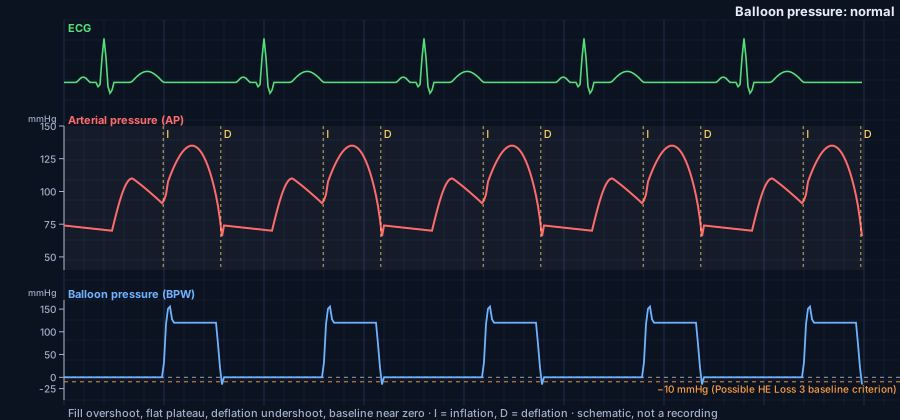
- First start after power-up: a purge cycle, then the balloon pressure waveform appears and pumping begins.27,28
- A high plateau that keeps falling is the balloon unwrapping. The console allows up to 300 beats (about 2½ minutes).21
If not
- PURGE FAILURE
- Check there is a trigger and the balloon is connected; then look for leaks or low helium.29,30
- HIGH PRESSURE after the unwrap window
- Look for a kink, a balloon still in the sheath, or one too high, too low or too large. Don't just turn the volume down.21,31
- HIGH BASELINE
- The balloon isn't emptying. If it may be partly inflated, disconnect and aspirate with a 60 cc syringe.32
-
8
Confirm the trigger
Do
- Compare the displayed heart rate with the patient's. Look for a white marker on every triggered beat, matching the assist ratio.33
Expect
If not
-
9
Check timing at 1:2
Do
Expect
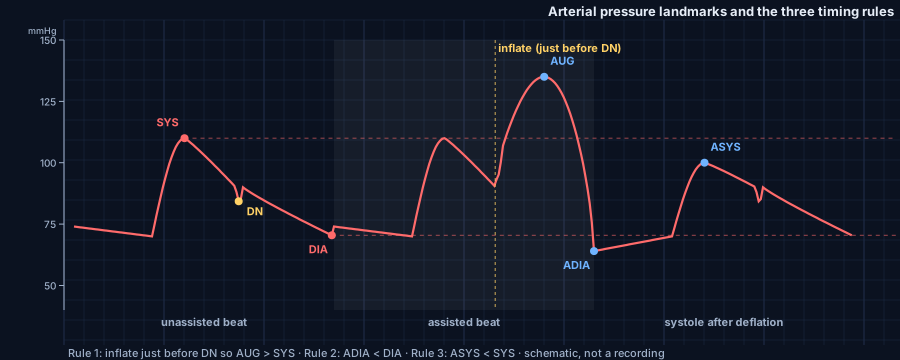
- Inflation just before the dicrotic notch, so AUG is higher than SYS.36
- Assisted end-diastolic pressure lower than unassisted (ADIA < DIA); assisted systole lower than unassisted (ASYS < SYS).36
If not
- AUG not higher than SYS
- Look for late inflation; then check balloon size and position.30
- ADIA not lower than DIA
- Late deflation. Under R-Wave deflation, switch to NEVER R-Wave or adjust in Operator mode.30,37
- AutoPilot™ timing looks wrong
- Select Operator mode and move inflation and deflation by hand, watching each change on the arterial waveform.27,38
-
10
Check the balloon, then go to full support
Do
Expect
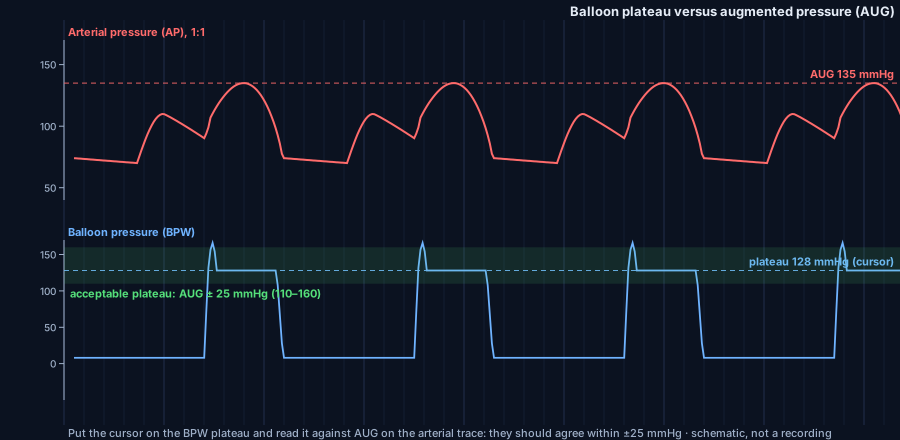
- Plateau within 25 mmHg of AUG.36,41
- Full mechanical support at 1:1. Re-check the console after any patient move.22,37
If not
- Plateau more than 25 mmHg above AUG
- Balloon may be too large. Reducing volume may need a physician order; never below two-thirds of capacity.42,43
- Plateau agrees with AUG, but AUG is well below SYS
- Balloon may be too small or too low. Check position before changing settings.42
- Pump stops and won't restart
- Get the backup. After 15 to 30 minutes without pumping, cycle the balloon by hand with a 50–60 cc syringe.44,45
- ✓
Full mechanical support
References
- Arrow International Inc. AC3™ Series IABP System Service Manual. Part No. IAM-9011, Rev 00. Reading, PA: Arrow International Inc (Teleflex); 2015. p 108.
- Teleflex Inc. Intra-Aortic Balloon Catheters: Proactively Meeting Your Counterpulsation Needs [brochure]. MC-000164 Rev 5. Wayne, PA: Teleflex Inc; March 2025.
- Arrow International Inc. AC3™ Series IABP System Service Manual. Part No. IAM-9011, Rev 00. Reading, PA: Arrow International Inc (Teleflex); 2015. p 100.
- Arrow FiberOptix IAB shelf-stock box labels, REF IAB-05840-LWS-SC (40 cc) and IAB-05850-LWS-SC (50 cc), lots 2025 [photograph]. Course author's photograph; October 2026.
- Arrow International Inc. AC3™ Series IABP System Service Manual. Part No. IAM-9011, Rev 00. Reading, PA: Arrow International Inc (Teleflex); 2015. p 98.
- Arrow International Inc. AC3™ Series IABP System Service Manual. Part No. IAM-9011, Rev 00. Reading, PA: Arrow International Inc (Teleflex); 2015. p 99.
- Arrow International Inc. AC3™ Series IABP System Service Manual. Part No. IAM-9011, Rev 00. Reading, PA: Arrow International Inc (Teleflex); 2015. p 101.
- Arrow International Inc. AC3™ Series IABP System Service Manual. Part No. IAM-9011, Rev 00. Reading, PA: Arrow International Inc (Teleflex); 2015. p 242.
- Arrow International Inc. AC3™ Series IABP System Service Manual. Part No. IAM-9011, Rev 00. Reading, PA: Arrow International Inc (Teleflex); 2015. p 15.
- Arrow International Inc. AC3™ Series IABP System Service Manual. Part No. IAM-9011, Rev 00. Reading, PA: Arrow International Inc (Teleflex); 2015. p 116.
- Arrow International Inc. AC3™ Series IABP System Service Manual. Part No. IAM-9011, Rev 00. Reading, PA: Arrow International Inc (Teleflex); 2015. p 102.
- Arrow International Inc. AC3™ Series IABP System Service Manual. Part No. IAM-9011, Rev 00. Reading, PA: Arrow International Inc (Teleflex); 2015. p 166.
- Arrow International Inc. AC3™ Series IABP System Service Manual. Part No. IAM-9011, Rev 00. Reading, PA: Arrow International Inc (Teleflex); 2015. p 46.
- Arrow International Inc. AC3™ Series IABP System Service Manual. Part No. IAM-9011, Rev 00. Reading, PA: Arrow International Inc (Teleflex); 2015. p 104.
- Arrow International Inc. AC3™ Series IABP System Service Manual. Part No. IAM-9011, Rev 00. Reading, PA: Arrow International Inc (Teleflex); 2015. p 48.
- Arrow International Inc. AC3™ Series IABP System Service Manual. Part No. IAM-9011, Rev 00. Reading, PA: Arrow International Inc (Teleflex); 2015. p 105.
- Arrow International Inc. AC3™ Series IABP System Service Manual. Part No. IAM-9011, Rev 00. Reading, PA: Arrow International Inc (Teleflex); 2015. p 47.
- Arrow International Inc. AC3™ Series IABP System Service Manual. Part No. IAM-9011, Rev 00. Reading, PA: Arrow International Inc (Teleflex); 2015. p 118.
- Arrow International Inc. AC3™ Series IABP System Service Manual. Part No. IAM-9011, Rev 00. Reading, PA: Arrow International Inc (Teleflex); 2015. p 120.
- Teleflex Inc. Arrow Intra-Aortic Balloon Catheter Options: Proactively Meeting Your Counterpulsation Needs [brochure]. MC-000164 Rev 2. Wayne, PA: Teleflex Inc; November 2017. p 5.
- Arrow International Inc. AC3™ Series IABP System Service Manual. Part No. IAM-9011, Rev 00. Reading, PA: Arrow International Inc (Teleflex); 2015. p 191.
- Arrow International Inc. AC3™ Series IABP System Service Manual. Part No. IAM-9011, Rev 00. Reading, PA: Arrow International Inc (Teleflex); 2015. pp 226-227.
- Arrow International Inc. AC3™ Series IABP System Service Manual. Part No. IAM-9011, Rev 00. Reading, PA: Arrow International Inc (Teleflex); 2015. p 79.
- Arrow International Inc. AC3™ Series IABP System Service Manual. Part No. IAM-9011, Rev 00. Reading, PA: Arrow International Inc (Teleflex); 2015. p 23.
- Arrow International Inc. AC3™ Series IABP System Service Manual. Part No. IAM-9011, Rev 00. Reading, PA: Arrow International Inc (Teleflex); 2015. p 125.
- Teleflex Inc. Arrow AC3 Safety Information: indications, contraindications, warnings, cautions, adverse events. Teleflex Interventional website. Updated April 20, 2023. Accessed October 23, 2026. Warning 34.
- Arrow International Inc. AC3™ Series IABP System Service Manual. Part No. IAM-9011, Rev 00. Reading, PA: Arrow International Inc (Teleflex); 2015. p 132.
- Arrow International Inc. AC3™ Series IABP System Service Manual. Part No. IAM-9011, Rev 00. Reading, PA: Arrow International Inc (Teleflex); 2015. p 60.
- Arrow International Inc. AC3™ Series IABP System Service Manual. Part No. IAM-9011, Rev 00. Reading, PA: Arrow International Inc (Teleflex); 2015. pp 194-195.
- Teleflex Inc. Arrow Intra-Aortic Balloon Pump Series: Timing Guidelines [trifold]. MC-004848 Rev 1. Wayne, PA: Teleflex Inc; December 2019. p 2.
- Arrow International Inc. AC3™ Series IABP System Service Manual. Part No. IAM-9011, Rev 00. Reading, PA: Arrow International Inc (Teleflex); 2015. pp 224-225.
- Arrow International Inc. AC3™ Series IABP System Service Manual. Part No. IAM-9011, Rev 00. Reading, PA: Arrow International Inc (Teleflex); 2015. p 192.
- Arrow International Inc. AC3™ Series IABP System Service Manual. Part No. IAM-9011, Rev 00. Reading, PA: Arrow International Inc (Teleflex); 2015. p 126.
- Arrow International Inc. AC3™ Series IABP System Service Manual. Part No. IAM-9011, Rev 00. Reading, PA: Arrow International Inc (Teleflex); 2015. p 133.
- Teleflex Inc. Arrow AC3 Safety Information: indications, contraindications, warnings, cautions, adverse events. Teleflex Interventional website. Updated April 20, 2023. Accessed October 23, 2026. Warning 43.
- Teleflex Inc. Arrow Intra-Aortic Balloon Pump Series: Timing Guidelines [trifold]. MC-004848 Rev 1. Wayne, PA: Teleflex Inc; December 2019. p 1.
- Arrow International Inc. AC3™ Series IABP System Service Manual. Part No. IAM-9011, Rev 00. Reading, PA: Arrow International Inc (Teleflex); 2015. p 106.
- Teleflex Inc. Arrow AC3 Safety Information: indications, contraindications, warnings, cautions, adverse events. Teleflex Interventional website. Updated April 20, 2023. Accessed October 23, 2026. Warning 9.
- Arrow International Inc. AC3™ Series IABP System Service Manual. Part No. IAM-9011, Rev 00. Reading, PA: Arrow International Inc (Teleflex); 2015. p 136.
- Arrow International Inc. AC3™ Series IABP System Service Manual. Part No. IAM-9011, Rev 00. Reading, PA: Arrow International Inc (Teleflex); 2015. p 107.
- Arrow International Inc. AC3™ Series IABP System Service Manual. Part No. IAM-9011, Rev 00. Reading, PA: Arrow International Inc (Teleflex); 2015. p 224.
- Arrow International Inc. AC3™ Series IABP System Service Manual. Part No. IAM-9011, Rev 00. Reading, PA: Arrow International Inc (Teleflex); 2015. p 134.
- Teleflex Inc. Arrow AC3 Safety Information: indications, contraindications, warnings, cautions, adverse events. Teleflex Interventional website. Updated April 20, 2023. Accessed October 23, 2026. Warning 33.
- Arrow International Inc. AC3™ Series IABP System Service Manual. Part No. IAM-9011, Rev 00. Reading, PA: Arrow International Inc (Teleflex); 2015. p 112.
- Teleflex Inc. Arrow AC3 Safety Information: indications, contraindications, warnings, cautions, adverse events. Teleflex Interventional website. Updated April 20, 2023. Accessed October 23, 2026. Warning 26.
- Arrow International Inc. AC3™ Series IABP System Service Manual. Part No. IAM-9011, Rev 00. Reading, PA: Arrow International Inc (Teleflex); 2015. pp 98-137.
- Arrow International Inc. AC3™ Series IABP System Service Manual. Part No. IAM-9011, Rev 00. Reading, PA: Arrow International Inc (Teleflex); 2015. pp 191-195.
- Teleflex Inc. Arrow AC3 Safety Information: indications, contraindications, warnings, cautions, adverse events. Teleflex Interventional website. Updated April 20, 2023. Accessed October 23, 2026.
- Teleflex Inc. Arrow Intra-Aortic Balloon Pump Series: Timing Guidelines [trifold]. MC-004848 Rev 1. Wayne, PA: Teleflex Inc; December 2019. pp 1-2.
Learn IABP · Not a substitute for the Operator's Manual, the IAB catheter Instructions for Use, or institutional training.